Export your data of Monstock at Excel format. You can then update it to re-import on the application.
You can export your data directly on the Import/Export page, or export it directly from the page that interests you.
-
From the import/export page
To access the import/export page, open the administration tab by clicking on the following button :

Then click on "Import/Export" :

The left side of the screen concerns the imports (see our tutorial about that for more detail)
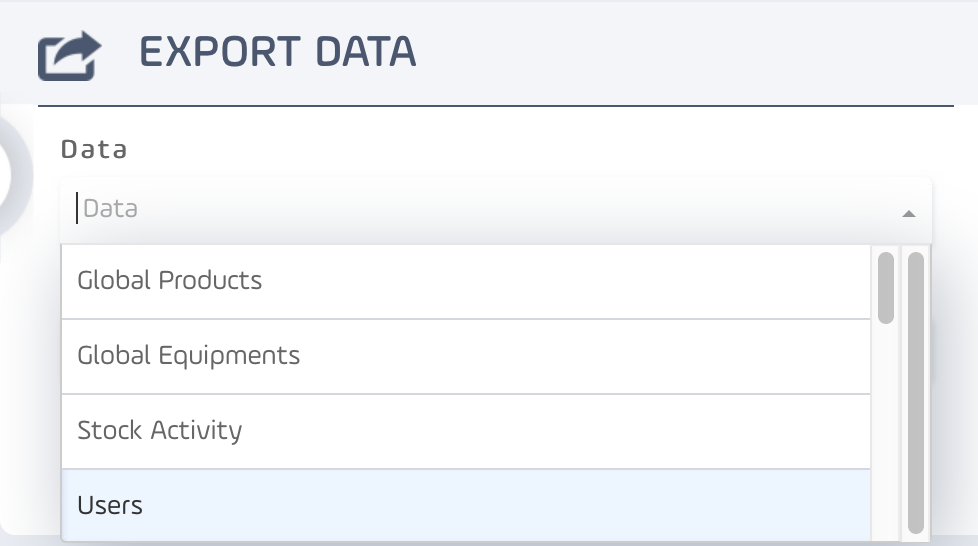
For the exports, we will use the right side of the screen. Click on "Data" to select the type of data you want to export :
Then choose the format of the file (XLSX, XLS, CSV, PDF) :

Then click on "Export" :

Here are the data you can export from this page :
| Data | Data exported |
| Global Products | Exports all the products with their information such as the site where the product is stored, the quantity, the supplier, etc. |
| Global Equipments | Exports all the equipments with their information such as the site where the product is stored, the quantity, the supplier, etc. |
| Stock Activity | Exports the history of stock activities with complete informations (date, type of acvtivity, user initiating the activity, product or equipment concerned, etc.). |
| Users | Exports the list of your users (username, contact information). |
| Groups | Exports the list of your groups with their descriptions. |
| Categories | Exports the list of your categories. |
| Customers | Exports the list of your customers with their informations (name and contact information). |
| Suppliers | Exports the list of your suppliers with their informations (name and contact information). |
| Tags | Exports the list of your tags. |
| Moves | Exports the history of the moves with the related informations (adte, quantity, moved product, user initiating the move, etc.) |
| Transfers | Exports the history of the transfers with the related informations (adte, quantity, moved product, user initiating the transfer, etc.) |
| Global client orders | Exports the history of the customer orders. |
| Details client orders | Exports a more detailled history of the customer orders. |
| Global supplier orders | Exports the history of the supplier orders. |
| Details supplier orders | Exports a more detailled history of the supplier orders. |
-
From Monstock pages :
You also can export data your product list, equipment list, etc. Here is an example with the product list :

Comments
0 comments
Please sign in to leave a comment.